Showing posts with label Dynamics NAV. Show all posts

Thursday, June 22, 2017

Tool Tip - Calculate How Many Working Days and Public Holidays For HR and Payroll

image

Figure 1 – Screen shot of Calendar for "How many working days and public holidays from date to date"

If you ever have to figure out the number of working days and public holidays from one date to another, the website http://www.workingdays.ca/Alberta.htm#aepd is the perfect tool to use to come up with the correct number of days. 

This window has multiple uses:

1. Use it to calculate a payout for an employee that is leaving

2. Use it to calculate the number of days and vacation for budgeting for the next fiscal year – it goes out to future years

3. Use it to fix the public holiday dates for sending out the notice for the upcoming year statutory days

4. Use it to check statutory days between Canada and the United States for planning purposes when the company works in both countries

5. Use it for planning weekend shifts for manufacturing shifts and for retail shifts

Using the Calendar function is much faster than counting the days manually on a calendar.

For other tips and tool tricks, keep reading this blog. 

Please contact us for more information on Dynamics ERP capabilities or to find out how we can help you with a Dynamics implementation.

Send an email to Support@dynamicsmct.com or call us at Toll Free:  +1.780-555-6144.

Submitted by Judith Hirst CPA, CMA MCP Senior Financial Analyst

www.dynamicsmct.com

Tuesday, June 13, 2017

Jet Reports 2017 R2 Has Been Released With New Features

image

Figure 1 –  Income Statement by Month from Jet Reports

Jet Reports 2017 R2 represents significant enhancements for how you can manage, run and view your business reports in Jet Professional and Jet Enterprise. 

The following information comes from the Jet Reports publication on the new features in release 2017 R2.

New Features Available in Jet Reports 2017 R2

image

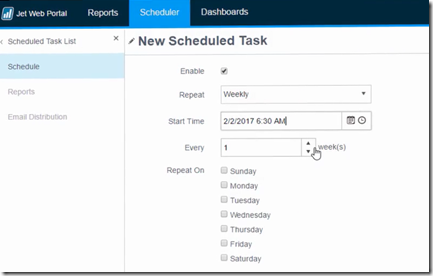
Figure 2 – Jet Web Portal Scheduler

Web Scheduling - Jet Professional 2017 R2 introduces a web-based scheduler for reports. Jet Web Portal users can now easily set
their Jet reports to run on a monthly, weekly, daily, or even more frequent basis and be distributed via email.  Users can create a schedule, and then set up one or multiple reports to be run and distributed via email.  The scheduling capability is quite flexible, and makes it easy to set up schedules for:
• The last day of the month
• The first Monday of the month
• Every hour between 8am and 5pm
• And much more

New Drilldown Features… 

Drilldown Available in Web Portal Reports -   When a user downloads a report from the Jet Web Portal they can now click on a cell to see the underlying data.

Drilldown for Dynamics GP GL function - Dynamics GP users can now drilldown into their GL queries to see the underlying financial transactions. This allows users to quickly get a deep understanding of their finances.

Report Options tool

Designers can use a new Report Options tool to quickly create and manage user-selectable parameters/filters on their reports. This speeds up report creation and makes it easier to learn how to the report options window feature.

No longer do you need to add tags for ‘title’, ‘value’, ‘option’ etc. to create a report options window. A simple tool now takes care of this for you.

Does your finance team have an interest in Jet Reports?  Contact us.  The team at Dynamics MCT Consulting  provides a full range of Microsoft Dynamics services.  For more information on Jet Reports or to ask questions about how we can help you with a Dynamics implementation, send an email to Support@dynamicsmct.com or call us at Toll Free:  +1.780-555-6144.

Submitted by Judith Hirst CPA, CMA MCP Senior Financial Analyst

www.dynamicsmct.com

Tuesday, June 6, 2017

Five Reasons To Keep The Vendor (Supplier) List Clean

image

Figure 1 – The push broom used to keep shop floors clean

Most organizations have a safety policy in place.  High on the list of safety is keeping the premises clean and tidy.  An extension of this "clean and tidy" practice should be to keep the vendor list clean in the ERP system.

Why? Here are five reasons to keep the vendor list clean.

  1. The longer and messier that the vendor list is, the more likely coding errors will happen. 
  2. This increases the chances of the wrong vendor being paid for an invoice assigned to them in error.
  3. Now, there are two voids to process, one for the cheque payment, and one for the invoice.
  4. If Vendors have not been used in the last two years, inactivate them to reduce the risk that invoices will inadvertently be assigned to them. (In Dynamics GP, for example, run a SmartList to show vendors that have not received payment for the last two years, and then inactivate them.)
  5. Managing the vendor list and reviewing it quarterly or semiannually will help to minimize the occurrence of fraudulent vendors, that is, vendors who submit the same invoice under different names.  You will catch these errors  because  you are watching.

The team at Dynamics MCT Consulting has been implementing Microsoft Dynamics ERP Business Solutions for more than 15 years and provides a full range of Microsoft Dynamics services.  Please contact us for more information on capabilities or how we can help you with a Dynamics implementation.

Send an email to Support@dynamicsmct.com or call us at Toll Free:  +1.780-555-6144.

Submitted by Judith Hirst CPA, CMA MCP Senior Financial Analyst
www.dynamicsmct.com